Call To Order

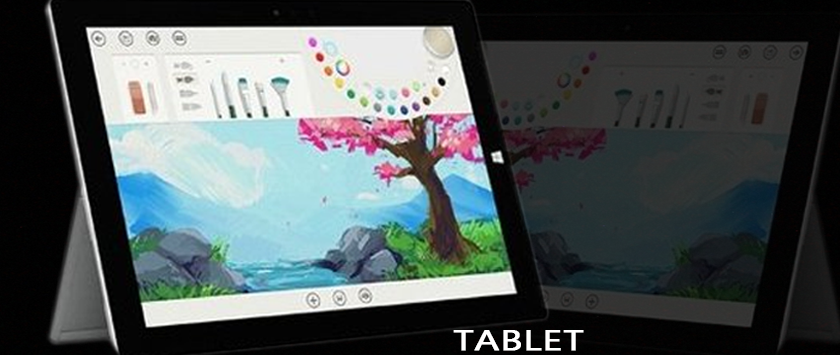
A tablet computer, commonly shortened to tablet, is a mobile computer with a touchscreen display, circuitry and battery in a single device. Tablets come equipped with sensors, including cameras, a microphone and an accelerometer, and the touchscreen display uses finger or stylus gestures substituting for the use of computer mouse and keyboard. They usually feature on-screen, pop-up virtual keyboards for typing. Tablets may include physical buttons for basic features such as speaker volume and power, and ports for network communications and battery charging. Tablets are typically larger than smartphones or personal digital assistants at 7 inches (18 cm) or larger, measured diagonally.
With large screens and fast connectivity, tablets are perfect for surfing the internet, streaming movies, reading eBooks, playing games and more. We have a range of the most popular tablets from some of the world's leading brands, tablets from brands like Fire, Apple, Microsoft, Acer, ASUS, Lenovo, and Samsung. You'll find iOS (Apple), Windows, and Android tablets.
Features
The tablet's interface works through touch. The finger is used to tap on the screen to click buttons and other user interface elements instead of using a mouse. Multi-finger gestures allow the user to perform more complex functions such as zooming in and out, swiping between applications quickly or returning to the home screen. Experts say touch allows the user to navigate in a more intuitive way.
As with smartphones, most mobile tablet apps are supplied through online distribution, rather than boxed software or direct sales from software vendors. These sources, known as "app stores", provide centralized catalogs of software and allow "one click" on-device software purchasing, installation and updates. The app store is often shared with smartphones that use the same operating system.
1. Hardware
- High-definition, anti-glare display
- Wireless local area and internet connectivity (usually with Wi-Fi standard and optional mobile broadband)
- Front- and/or back- facing camera(s) for photographs and video
- Lower weight and longer battery life than a comparably-sized laptop
- Bluetooth for connecting peripherals and communicating with local devices
- Early devices had IR support and could work as a TV remote controller.
- Docking station: Keyboard and USB port(s)
- Special hardware: The tablets can be equipped with special hardware to provide functionality, such as camera, GPS and local data storage.
2. Software
- Mobile web browser
- E-book readers for digital books, periodicals and other content
- Downloadable apps such as games, education and utilities
- Portable media player function including video and music playback
- Email and social media
- Mobile phone functions (messaging, speakerphone, address book)
- Video-teleconferencing
3. Data storage
- On-board flash memory
- Ports for removable storage
- Various cloud storage services for backup and syncing data across devices
- Local storage on a LAN
4. Additional inputs
Besides a touchscreen and keyboard, some tablets can also use these input methods:
Character recognition to write text on the tablet, that can be stored as any other text in the intended storage, instead of using a keyboard.
Essential Features Every Tablet Buyer Should Look For
For someone in the market for a tablet, it is important to know what to look for, including what options are essential and which ones a person can live without.
Feature 1: Operating System
Probably the most important consideration when looking for a tablet is the operating system (OS). There are four basic operating systems in use.
Apple iOS
Used exclusively on Apple products, the Apple iOS version used on the iPad is essentially the same one used on the iPhone, iTouch, and iPod Touch. The iPad version is modified to fit the larger screen. Apple's iOS for iPad leads the way for both application and user interface, offering more than 2 million applications through the Apple App Store.
Google Android
A popular OS used on tablets is the Android OS by Google. This is the same OS used on many smartphones. While similar in feel to Apple's iOS, it is not quite the same. Android offers greater customizability than iOS. While once lacking in app choices Android now has the largest app store with more than 2.2 million apps available. Additionally, with Android is you are not tied to one app store like you are with the iPad.
Microsoft Windows
Although only holding a small share of the tablet market, the Windows Tablet PC offers the advantage of being fully compatible with the Windows OS used on desktop and laptop computers. Being able to access Windows 8 on a small portable device while being on the go can have advantages compared to being tied to a full-size laptop or desktop. This provides ease of file transfer for people who use tablets as portable computers and a similar user experience.
BlackBerry Tablet OS
RIM, the manufacturer of BlackBerry smartphones, has developed its own OS for its tablet computer: the BlackBerry Tablet OS. This tablet is fully compatible with the BlackBerry cellphone, making it the ideal complementary tablet for BlackBerry phone users.
Feature 2: Screen Size & Resolution
Tablets come in sizes ranging from 5 inches to 12 inches. The smaller tablets are essentially large smartphones. Larger tablets provide more screen real estate at the cost of being too big for a pocket or purse. Mid-sized tablets (7 to 8 inches) are intended to provide a compromise between being portable and still having a screen large enough to show an entire page of a book.
The higher the resolution, the sharper the images appear. If using the tablet for watching high-definition movies, a minimum resolution of 720 pixels across the shorter dimension is necessary.
Feature 3: Memory (RAM)
Due to their smaller form factor, random access memory (RAM) options are limited on a tablet and there is no option to upgrade later. Consider what you use the tablet for and choose a device with an appropriate amount of RAM. For instance, if you are going to edit photos or video on the device you want memory in the 4GB to 8GB range at a minimum, and a Microsoft Surface can be configured with up to 16GB of RAM. For activities like video playback, watching movies, and email or Web browsing via Wi-Fi, 1 GB to 4GB would be sufficient.
Feature 4: Wireless Connectivity
Virtually all tablets have some wireless capability, which usually means being Wi-Fi capable. However, there are two versions of Wi-Fi. Some tablets only support the 802.11b/g specification. For streaming a lot of video and downloading large items, this may not be adequate. If those activities are part of the intended use, it is best to buy a tablet that is compatible with the 802.11n specification. A tablet that supports both 2.4GHz and 5.0GHz radio bands provides the most complete Wi-Fi connectivity.
Feature 5: Camera
Most tablets come with one or two cameras. One faces the rear of the tablet allowing you to use the tablet as a camera. If equipped, the other is a front-facing camera suitable for taking selfies or for use as a webcam. However, when looking at a tablet with only one camera, know where the camera is located, whether on the back or front of the device.
With camera resolution, essentially, tablets have the same types of digital cameras as smartphones. As a general rule, 4MP is the minimum specification for printing a quality 8x10 image, without cropping or distortion. If the camera is a lower resolution this will be made more obvious on the larger tablet screen than would be apparent on a smartphone.
Feature 6: Speakers
While most tablet owners use headphones, there are times when it is necessary to use the internal tablet speakers. These speakers are tiny, so they are not going to produce a big speaker sound. If it is possible to try out the tablet before buying it, checking the speaker sound only takes a moment.
Feature 7: Inputs and Outputs
Tablet computers are not intended to provide a lot of connectivity to the outside world, except through wireless connections. Nevertheless, many come with a 3.5mm headphone jack and a USB port. In addition, some manufacturers provide a docking port for connection to keyboards and docking stations. Note that Apple's iPad does not have a USB port. One option available if you need dual USB ports is the Microsoft Surface Book.
Feature 8: Battery Life
As tablets are portable units, tablet battery life is extremely important. Three things affect tablet battery life: size of the battery, brightness of the screen backlight, and amount of time the tablet is on. Most users leave their tablets on when not using them and merely put them in "sleep" mode. Therefore, there are two different battery life metrics to take into consideration: amount of time the battery powers the unit in sleep mode and amount of time the battery powers the unit while in use.
Benefits of using a tablet
1. It’s Portable
No matter where business or pleasure takes you, they can take a tablet PC along with you. Sure, notebooks are also portable, but they are heavier and can’t easily be held with just one hand. Real estate agents can use a tablet for recording details when showing houses, or giving potential home buyers a peek inside other homes that are up for sale. Students can tote it around in their school bags and capture notes quickly and with ease during classes–no more lugging around half a dozen paper notebooks. Tablet PCs are also great for entertaining the kids on long car or plane trips; just put on a film or let them open a game, and they’ll be pleasantly quiet for a good length of time. Not to mention the tablet pc is the ideal medium for business presentations at customer meetings
2. It’s A Great E-Book Reader
While most electronic books can be read on nearly any electronic device, reading is better on a tablet. It’s a lot more enjoyable to read novels when on the sofa, rather than sitting upright in a desk chair in one’s home office.
3. It’s Comfortable To Use
Tablets are sized to fit comfortably in one’s hands, even allowing you to hold the tablet with one hand which is great for reading or sharing the screen with others. Some tablet PCs offer rotating screens which makes using them with another person even easier. Since it’s also lightweight, it will be a go-to device when one needs to choose between a light weight tablet or a more cumbersome notebook computer.
4. It’s Very Functional
These portable devices make it easy to take most of what is in one’s PC with them where ever they go. Tablet users are never more than a few taps away from writing an email, chatting on Skype or searching the Internet to get information for their next big project.
5. It Uses A Reliable OS
Many tablets of today are using Apple’s iOS or Microsoft’s Windows 8/Windows RT as their operating system, which translates into a user experience that is familiar to those who use traditional computers at home or at work.
6. It Has Powerful Social Networking Tools
Since they are designed to connect to the Internet, tablets have great network applications that allow connecting with family, friends and business contacts on social media sites, collaborating on projects via cloud based applications and reading or watching the latest news.
7. It’s Great For Meetings
Whether the user is taking notes, recording what’s said or giving the presentation, a tablet is a useful in many situations. There’s no need to remember a pad of paper and a pen or pre-printed notes to help give a speech–all that information can be stored on a tablet. Users can reference past meeting notes without having to return to their office and look for them on their desktop. If the meeting brings up a question which requires an email being sent out ASAP? Send it off as soon as it gets typed up. For those who are ever stuck in a dull meeting, they can easily multi-task by catching up on some other work.
Kindly click on the link or image below to place your order
https://www.deluxe.com.ng/product-category/tablets
www.deluxe.com.ng
Category